Like many modern software packages, Horizon QCMS is updated regularly to address new security issues that may arise. Improving software security is always an ongoing concern, and to that end you should always keep up to date with the latest version of Horizon QCMS. Older versions of Horizon QCMS are not maintained with security updates.
Reporting Security Issues
If you think you have found a security flaw in Horizon QCMS, you can help by reporting the issue.
Easy upgrade: you can upgrade from any version of Horizon QCMS to 5.0 via upgrade/upgrade.php after you have downloaded version 5.0 from source forge.
Formbuilder offers CAPTCHA protection.
PDF generator: Horzion QCMS 5.0. has a PDF generator.
URL_REWRITE: Horizon QCMS 5.0. fully supports URL_REWRITE on apache webserver
Better protection against SQL injections: Horizion QCMS 5.0 is more secure and better protected against SQL injections. Horizon also loads the navigation menu faster.
MySQLi: Horiozon QCMS fully supports the MySQLi extension
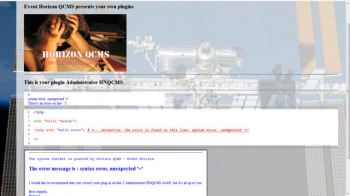
PHP assistant: Horizon QCMS 5.0 has a built-in PHP assistant, works only with PHP 5.2 or higher.
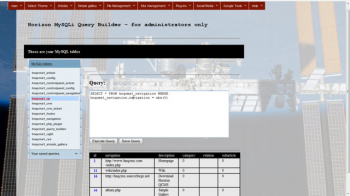
Querybuilder: Horizon QCMS 5.0 has a Querybuilder so that you can create your own customized queries
PHP Plugin creator: Horzion QCMS 5.0 has a PHP Plugin creator
CPanel editor: with Horizon QCMS 5.0 you can rename all the items for the control panel and the user panel so that you can create your own language pack without adjusting the source code of the control panel: all items are loaded dynamically with MySQL.
Formbuilder to CRM: If you use the FormBuilder and a visitor is using your web form, then the information will be sent to you by email, and the information will be stored in the MySQL database so that you can assess it with the CRM module.
Formbuilder to MySQL: formbuilder can also create MySQL tables for you and will create a plugin to access the information stored by Formbuilder, which you can use in your webpages if you want
Members only pages are now hidden from the navigation menu, if you use the MySQLi extension.
CRM tickets: Horizon 5.0 now also offers CRM tickets. You can now send messages directly to your clients.
E-commerce: Horizon QCMS 5.0 fully supports Paypal, you can now sell items on your website with Horizon QCMS on each webpage.
Twitter: Horizon QCMS 5.0 supports twitter
Disk cache: Horizon QCMS 5.0 also offers a disk cache system: if you don't update your website on a regular basis, then you can use the cache system to load your webpages even faster because horizon doesn't have to display a page dynamically.
Simple Gallery: now comes together with JQuery Photobox.
Simple Gallery edit: editing your photo album is now easier than ever.
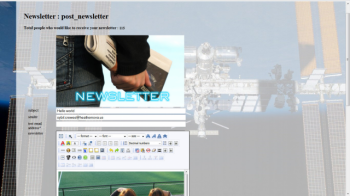
Newsletter: with Horizon QCMS 5.0 you can now send newsletters to your clients if you use Formbuilder to newsletter.
Improved database framework: it's now faster and more secure.
====================
written by Cynthia Fridsma
====================
Horizon QCMS 5.0 - Event Horizon is now available on SourceForge.net.
Improvements
SimpleGallery edit fix for Mozilla browsers.
Removing of all old control panel tags.
Database class: fix on the sub category with current id.
File management: close fix on loading a template.
Control panel: fix on loading control panel when there's no slash.
Control panel: better message that your version of Horizon QCMS is out of date.
Navigation: members_only pages are no longer visible for visitors. Only members can see them.
Control pannel for the Internet Explorer: if Horizon QCMS detects MS-IE then Horizon will load the controlpanel for MS-IE, so that you can maintain your website also with the Internet Explorer.
What's new?
Query Builder, you can now create customized queries for all your needs.
PHP Online tool so that you can create your own customized PHP plugins
PHP Assistant, only valid if your server has at least PHP 5.2
Formbuilder with database support: Formbuilder can now also create customized MySQL tables based on your web form. And Horizon will besides create a special PHP plug in order to retrieve the information from your web form.
Formbuilder offers a special newsletter support: create a web form with the subject newsletter and an email field in your form and Horizon will collect the email addresses for you. You can also ask for first_name and last_name, that is: if you use the field names: first_name and last_name. This will help you to create "personalized" newsletters.
You can now send HTML newsletters directly to your subscribers, with an automatic opt-out function.
E-commerce: if you enter your Paypal email address and select your currency, then you can sell your products on your website. Horizon will create all the necessary Paypal buttons for you to make it happen.
You can also adjust the control panel: you can now rename all control panel navigation buttons so that you can create your own "language" file.
Improved upgrade procedure: Horzion can now upgrade your existing version, starting with Horzion 3.5.x to Horizon 5.0 - Event Horizon.
HTML5 support for MP3 and MP4 media files.
Twitter support.
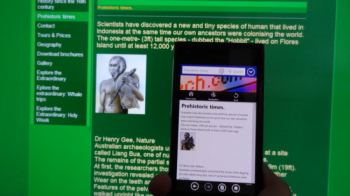
Cellphone support, Horizon will automatically display your website in a cellphone compatible layout.
Horizon only uses native MySQLi commands, which is way faster then PDO, although some geeks will disagree with me. However, let me put it this way: PDO is more like an SUV while native MySQLi is like a Ford Mustang with an American V8 engine, that's a lot of horsepower. Horizon is just like that.